 USD
USD EUR
EUR GBP
GBP CAD
CAD AUD
AUD HKD
HKD JPY
JPY KRW
KRW SGD
SGD NZD
NZD THB
THB TWD
TWD English
 日本語
日本語 한국어
한국어 Français
 Español
 Português
 Nederlands
 繁體中文
繁體中文
Big News! DIGIBox D6 Max Launches New iOS App – One Account, Two Smartphones!
Exciting news for DIGIBox D6 Max users!
The DIGIBox D6 Max App has officially expanded its compatibility to iOS devices! iPhone and iPad users can now download and enjoy the DIGIBox App on their Apple devices.
But that's not the only exciting update!
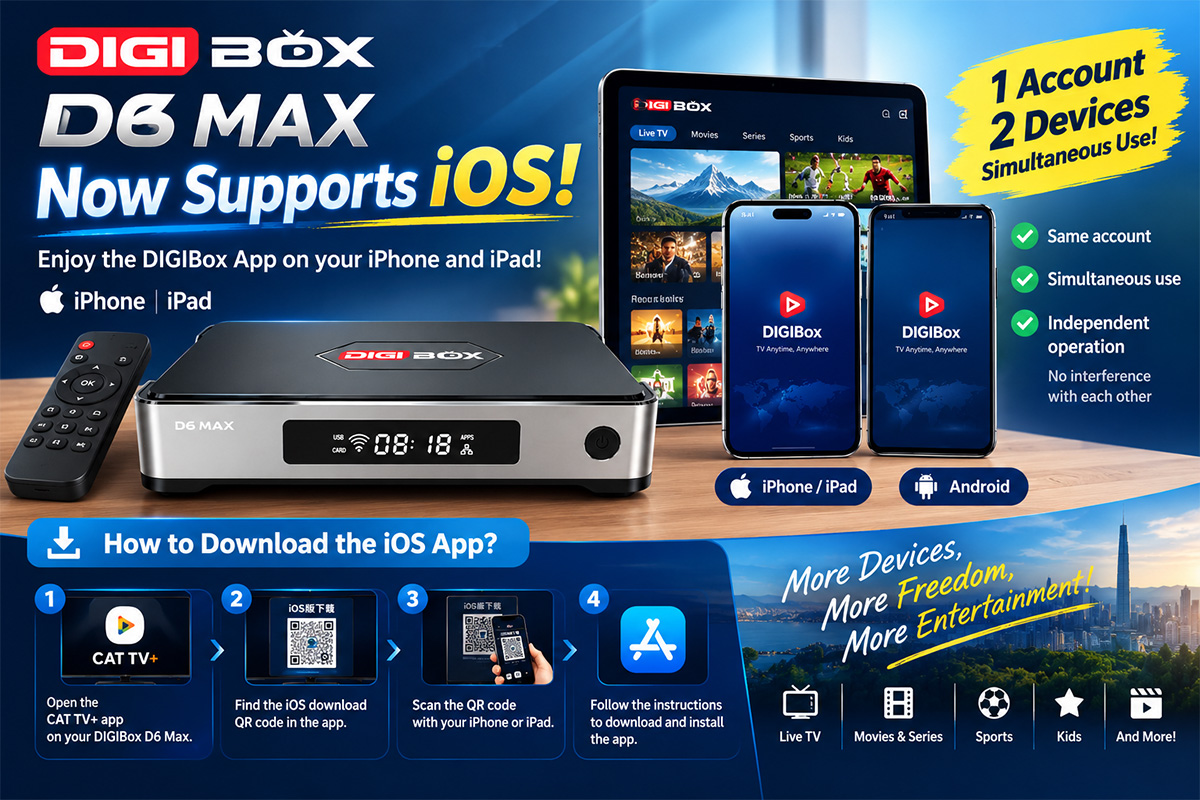
With the new iOS App, one DIGIBox D6 Max account can now support one Android smartphone and one iPhone simultaneously. Both devices can operate independently without interfering with each other.
Whether you use Android, iPhone, or both, DIGIBox D6 Max now offers even more flexibility for your entertainment experience.
Let's explore the new features and learn how to download the iOS App!
1. Introducing the New DIGIBox iOS App
Previously, DIGIBox mobile app users primarily used Android smartphones. Now, with the official launch of the iOS version, Apple users can also enjoy the convenience of mobile viewing.
The new iOS App brings more flexibility to DIGIBox users, especially households where family members use different smartphone platforms.
Key Features of the New iOS App:
-
iOS Compatibility: Now supports iPhone and iPad.
-
Android Compatibility: Existing Android App continues to work.
-
Same Account: Use the same DIGIBox account on both Android and iOS.
-
Simultaneous Usage: One Android smartphone and one iPhone can be used at the same time.
-
Independent Operation: Both devices operate independently without interfering with each other.
This update makes DIGIBox D6 Max even more convenient for users with different mobile devices.
2. One Account, Two Smartphones – Android and iPhone Simultaneously!
<bold>This is one of the most exciting features of the new update!</bold>
You no longer need to choose between Android and Apple devices.
A single DIGIBox D6 Max account can support:
-
1 Android smartphone
-
1 iPhone
Both devices can log in using the same account and operate simultaneously.
For example, one family member can use an Android smartphone while another uses an iPhone. Both can enjoy their own mobile viewing experience without interfering with each other.
No additional account required. No need to switch between devices.
It's a convenient solution for families and users who own both Android and Apple smartphones.
One Box. One Account. Two Smartphones. More Entertainment!
3. How to Download the DIGIBox iOS App
Downloading the new iOS App is simple. There are two convenient ways to get started.
Method 1: Download Directly from the Official Website
The easiest way is to visit the official download website using your iPhone or iPad.
Official Download Website:
Once you enter the website, it will automatically detect your device and provide the appropriate app version for download.
Simply follow the on-screen instructions to download and install the application.
No need to manually select the Android or iOS version!
Method 2: Scan the QR Code in the CAT TV+ App
You can also download the iOS App directly through your DIGIBox D6 Max.
Follow these steps:
-
Turn on your TV and open the CAT TV+ App.
-
Find the iOS App download QR code displayed within the app.
-
Open the camera on your iPhone or iPad.
-
Scan the QR code on your TV screen.
-
Follow the instructions to download and install the iOS App.
That's it! You can access the download page without manually entering a website address.
4. Easy Login – Two Convenient Options
After installing the application, you can log in using either of the following methods.
Option 1: Login with Your Account
Open the DIGIBox App and enter your existing account username and password.
Option 2: Scan the TV QR Code
If a login QR code is displayed on your TV screen, simply scan it with your smartphone to complete the login process.
Both options make getting started quick and convenient.
5. Why the New iOS Support Makes DIGIBox D6 Max Better
The launch of the iOS App is an important improvement to the DIGIBox D6 Max experience.
Here are the main advantages:
| Feature | What You Get |
|---|---|
| iOS Support | Compatible with iPhone and iPad |
| Android Support | Continue using the Android App |
| Same Account | One account for both platforms |
| Simultaneous Usage | One Android phone + one iPhone |
| Independent Operation | Both devices work without interfering with each other |
| Easy Download | Automatic device detection or QR code scanning |
Whether you are an Android user, an Apple user, or someone who owns both, DIGIBox D6 Max gives you more flexibility.
6. Experience the New DIGIBox D6 Max iOS App Today!
The new iOS App is officially available!
With Android and iOS compatibility, simultaneous usage on two smartphones, and convenient QR code downloading, DIGIBox D6 Max continues to bring a more flexible entertainment experience to its users.
Ready to try the new iOS App?
Visit our official download website:
Or simply open the CAT TV+ App on your DIGIBox D6 Max and scan the iOS download QR code.
DIGIBox D6 Max – One Bo